💰 Finance Settings
Comprehensive financial management and payment configuration settings for real estate companies
📋 Overview
Finance Settings is a comprehensive configuration section designed specifically for administrative departments and real estate company managers. This section contains critical settings that control payment notifications, currency management, delay payment handling, and financial document generation throughout your financial operations.
These configurations ensure efficient payment processing, automated financial communications, and streamlined financial workflow management across all departments.
🔔 Payment Notifications
Configure automated notification systems for payment milestones and unit purchase steps to ensure timely communication with customers and internal teams.
📋 Notify On Which Unit Steps
Select the specific unit purchase steps that will trigger automatic notifications. Choose the critical milestones where customers and team members should receive alerts.
💡 Multi-Selection: Hold CTRL key while clicking to select multiple steps for comprehensive notification coverage.
⏰ Notify On Selected Unit Steps After (in days)
Set the number of days after reaching the selected unit steps when the notification system should send alerts. This creates a delay buffer for payment processing and customer communication.
💳 Financial Configuration
Configure currency options, payment methods, and status categories for comprehensive financial management and consistent data entry across the system.
💱 Currency
Dropdown List: Configure the available currency options that will appear throughout the financial system. Add all currencies your company accepts for transactions and pricing.
💰 Paying Options
Dropdown List: Set up payment method options such as cash, bank transfer, credit card, installments, or financing. These options will appear in payment forms throughout the system.
⚠️ Late Payment Status
Dropdown List: Configure status categories for late payments such as "Overdue", "Grace Period", "Under Review", or "Collection Process". These help track and manage delayed payments.
📱 SMS Payment Notifications
Configure automated SMS content for payment-related communications, ensuring customers receive timely updates about their payment status and unit information.
📄 Selected Unit Steps To Notify - SMS Content
Customize the SMS message template that will be sent to customers when payment issues are detected. The system automatically fills in dynamic information using the placeholder variables.
📝 Default Message Template:
🎯 Dynamic Variables: The system automatically replaces [delayed step], [number of days], and [units names] with actual customer and unit information when sending the SMS.
📄 Document Templates
Configure professional document templates for reservations and contracts using automated data integration with Document Words for dynamic content generation.
🎫 Reservation Form
📝 Custom Form Content
Create your custom reservation form template in this text box. Design a professional form that includes all necessary project information, customer details, and legal requirements for your reservation process.
🎯 Professional Design: Include company branding, legal disclaimers, terms and conditions, and all required fields for a complete reservation document.
🔧 Automated Data Integration
Use Document Words feature to automatically populate customer and project information. This creates dynamic forms that pull data directly from the CRM system for accuracy and efficiency.
⚡ Smart Integration: Document Words automatically fills in customer names, project details, unit specifications, and pricing information without manual data entry.
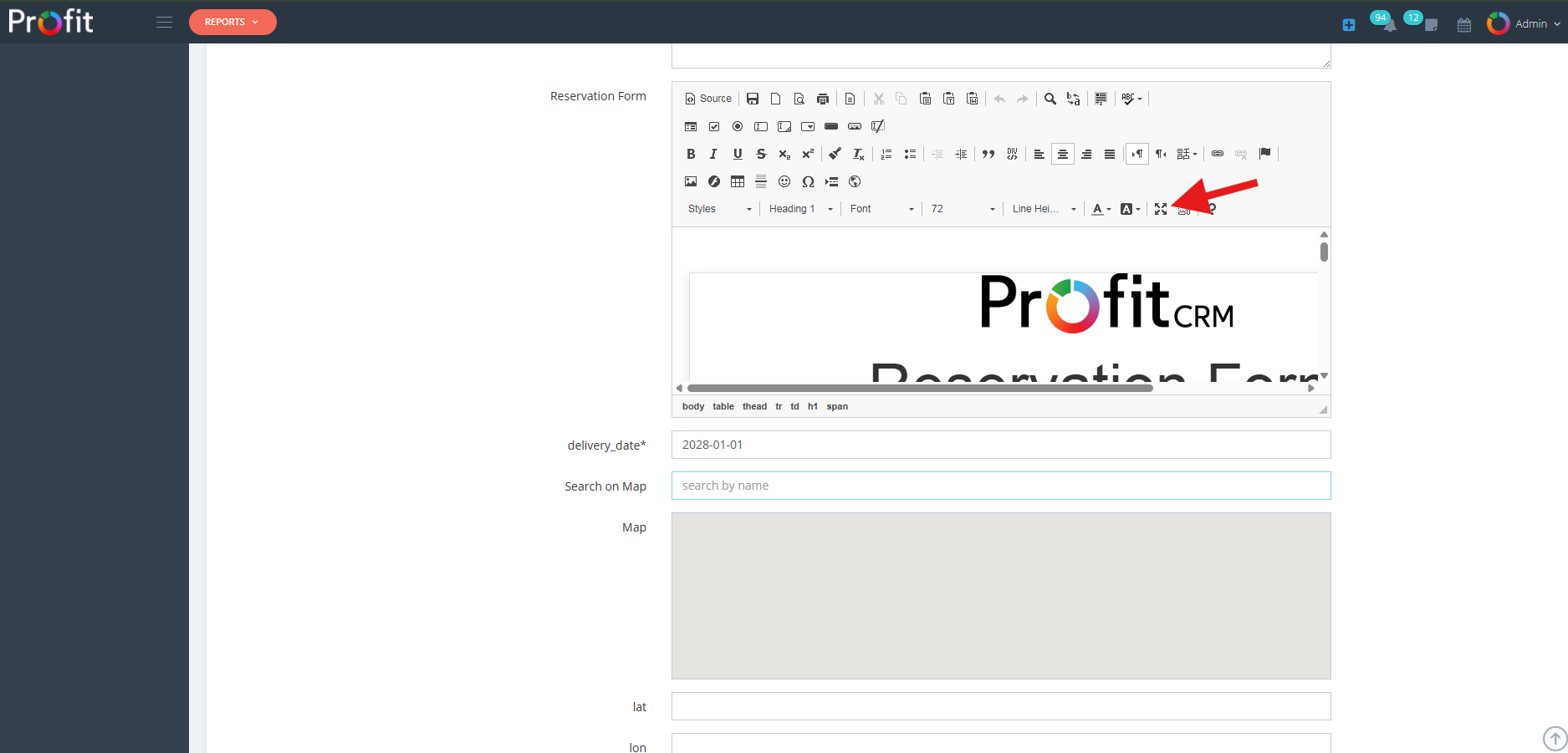
Final Generated Reservation Form
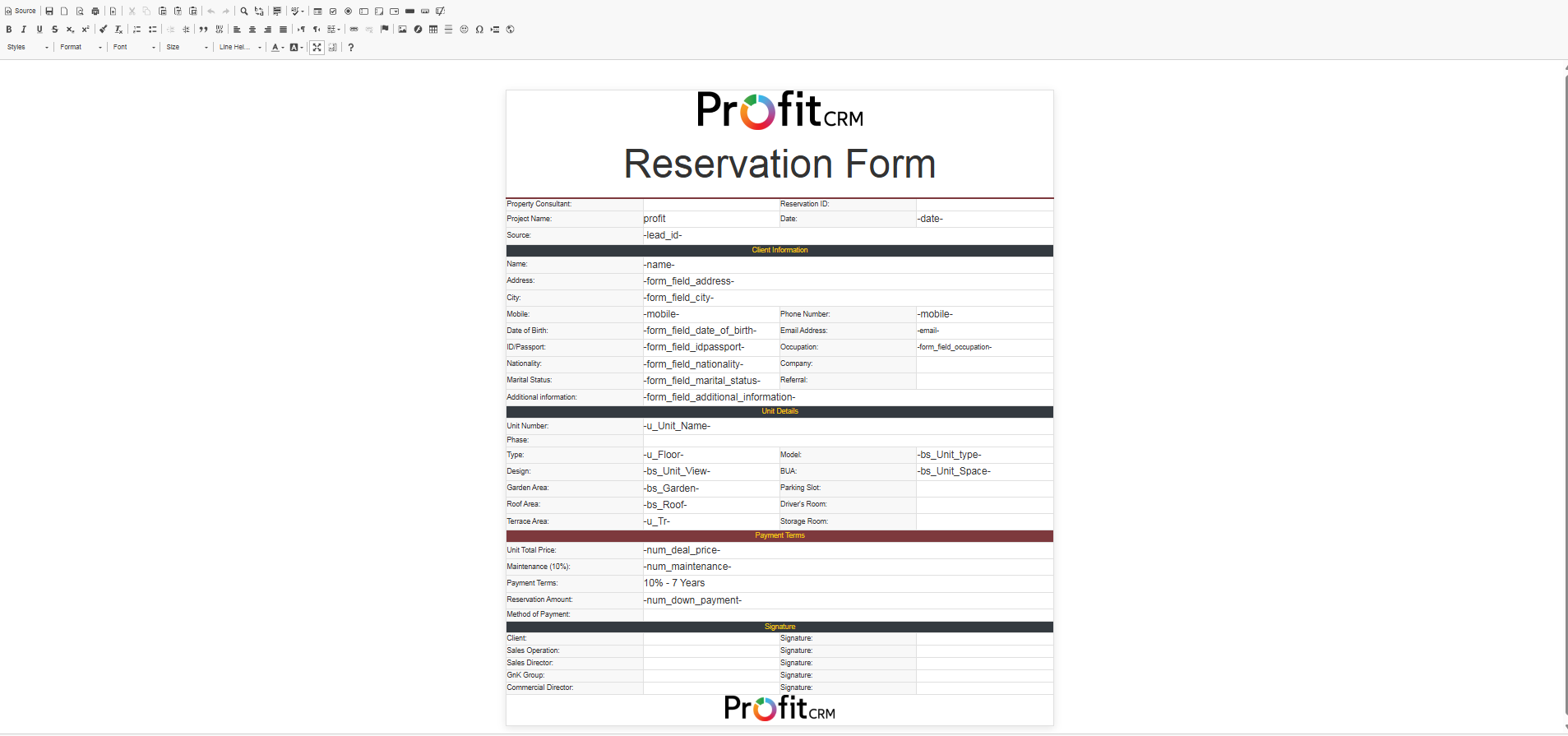
Template Configuration Interface
📋 Marketing Contract
📄 Contract Template Configuration
Similar to the Reservation Form, this section allows you to create professional marketing contract templates. The system uses the same Document Words integration for automated data population and dynamic content generation.
📋 Detailed Configuration: Complete setup instructions and usage examples will be provided in subsequent documentation sections for comprehensive contract management.
💳 Payment Management
Configure payment delays, fees, grace periods, and automated communication systems for comprehensive payment tracking and customer relationship management.
⏰ Delay Payment Configuration
📅 Delay Payment Grace Period (In Days)
Enter Days: Set the number of days customers have before late payment fees are applied. This grace period provides flexibility for payment processing delays.
💰 Delay Payment Fees
ON/OFF Setting: Enable or disable the automatic application of late payment fees when customers exceed the grace period for their payments.
📊 Delay Payment Fees Percentage %
Enter Percentage: Set the percentage fee calculated from the payment amount value that will be charged for late payments beyond the grace period.
📧 Remind Client with Payment by Email
ON/OFF Setting: Enable automatic email reminders to customers about upcoming or overdue payments for proactive communication.
🔔 Notify Payments
Permission-Based: Send payment notifications only to users who have payment permissions in the system, ensuring appropriate access control and communication flow.
⚠️ Extra Delay Management
🚨 Extra Delay Payment
ON/OFF Setting: Enable additional delay payment handling for severely overdue accounts requiring escalated collection procedures and enhanced monitoring.
⏱️ Extra Delay Payment Timer
Enter Duration: Set the time period for extra delay payment processing, defining when accounts move into escalated collection status.
👤 Client Profile Management
🏠 Hide Units Section On Client Profile
ON/OFF Setting: Control whether the units section appears on client profiles, providing flexibility in information display based on business requirements.
🔄 Return Refunded and Discarded Units to Hide
ON/OFF Setting: Automatically hide refunded and discarded units from client profiles to maintain clean, relevant information display.
⚙️ System Configuration
Configure system-level settings for invoice management and payment export validation to ensure data integrity and streamlined financial operations.
📄 Invoice Additional Note
Configure additional note content that will appear on all generated invoices. Include standard terms, conditions, payment instructions, or company-specific information for consistent invoice formatting.
📊 Payments Export Validation Hour (In Hours)
Enter Hours: Set the time window for payment export validation processes. This ensures data accuracy and prevents export conflicts during active payment processing periods.
⚠️ Administrator Notice
Critical Financial Settings Warning: All configurations in Finance Settings directly impact payment processing, financial reporting, and customer communications. Changes should be tested thoroughly in a controlled environment before deployment. Always backup current settings and coordinate with accounting and legal teams before implementing new financial policies or fee structures.